#Time series forecasting with BigQuery ML
Introduction
This post provides an overview of how to use BigQuery ML for time series prediction. The process will be mostly carried out using SQL queries. For this example, we will be using real-world data from Paris free bike service, Vélib. We’ll try to predict the availability of bikes in a station. We'll be using an ARIMA model, which is one of BigQuery ML built-in models.
Let’s begin with a short refresher on the main theoretical aspects.
Time series components
A time series can fundamentally be broken down into four components:
- Trend: This component captures the underlying pattern of progression in a time series, which could be either increasing or decreasing over time. It's the general direction in which the data is developing over long periods.
- Seasonal: The seasonal component represents regular fluctuations or patterns that occur at specific intervals such as daily, weekly, annually, etc. These patterns repeat over the short term and are often associated with the seasons or specific events.
- Cyclical: The cyclical component refers to fluctuations that occur over longer periods of time, usually over two or more years. These cycles are not of a fixed and regular period, unlike seasonal patterns.
- Residual: The residual component includes all other unexplained variations in the time series. These are fluctuations that are not captured by the trend, cyclical, or seasonal components. The residual component can be seen as "noise" or random variation.
ARIMA model
An ARIMA model, which stands for AutoRegressive Integrated Moving Average, is a class of models that is widely used in time series forecasting. This type of model captures a suite of different standard temporal structures in time series data.
The model is characterized by three main parameters:
- Auto-Regressive (AR) component: involves regressing the variable on its own lagged (past) values.
- Integration (I) or Differencing component: differencing is required to make the time series stationary. It is the process of subtracting the previous value from the current value, effectively calculating the change between consecutive time periods.
- Moving Average (MA) component: models the error term as a linear combination of error terms occurring contemporaneously and at various times in the past.
The complete ARIMA model is denoted as ARIMA(p, d, q), where:
pis the order of the AR component, i.e. how many past values are used in the model.dis the degree of the I (differencing) component, which indicates how many times the data have had past values subtracted.qis the order of the MA component, i.e. how many past residuals are used in the model.
BigQuery commands
We’ll use the following BigQuery commands to create and use our model:
CREATE MODELto create a time series model.ML.EVALUATEandML.ARIMA_EVALUATEto evaluate the model.ML.ARIMA_COEFFICIENTSto inspect the model coefficients.ML.FORECASTto forecast daily total visits.ML.EXPLAIN_FORECASTto retrieve various components of the time series (such as seasonality and trend) that can be used to explain the results.
Explore the data
For this tutorial, I have extracted 30 days of data from one specific Vélib station, collected at an hourly interval.
SELECT
    time_slot,
    num_bikes_available
FROM `velib.velib_hourly_training`
ORDER BY time_slot
Let’s have a first look at data:
# Plot training data
cutoff = '2023-09-26'
fig, ax = plt.subplots(figsize=(12,4))
sns.lineplot(
    data=df_bq.loc[lambda x: x['time_slot'] < cutoff],
    x='time_slot', y='num_bikes_available'
)
sns.lineplot(
    data=df_bq.loc[lambda x: x['time_slot'] >= cutoff],
    x='time_slot', y='num_bikes_available'
)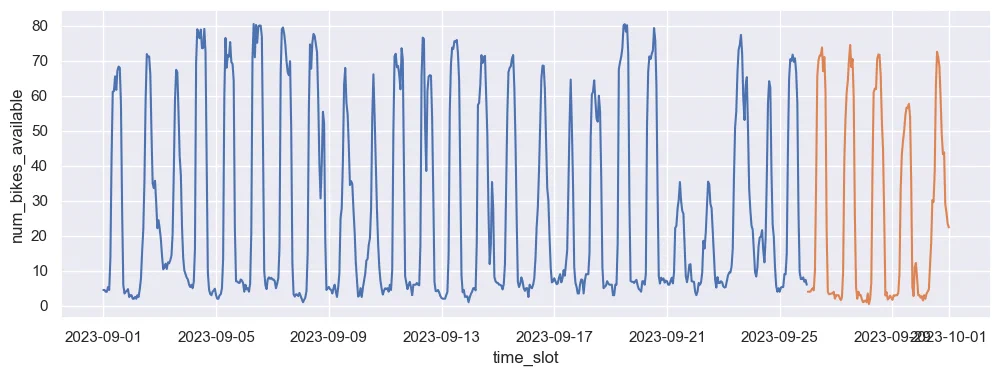
The line represents the number of available bikes at the station. Daily patterns are clearly visible, although with a dip on the 22nd and 23rd of September. We'll attempt to predict the last five days (highlighted in orange) using BigQuery ML.
Train the model
We use an ARIMA model to train on the 25 first days of data. Although a number of parameters can be customized, in this example we adhere to the default settings, except for HOLIDAY_REGION, that we set to France.
Training a model is done with the CREATE [OR REPLACE] MODEL instruction. In this case, the training only takes a few seconds.
CREATE OR REPLACE MODEL
  `velib.velib_arima_plus` OPTIONS(
    MODEL_TYPE='ARIMA_PLUS',
    TIME_SERIES_TIMESTAMP_COL='time_slot',
    TIME_SERIES_DATA_COL='num_bikes_available',
    HOLIDAY_REGION='fr'
  )
  AS
SELECT
  time_slot,
  (avg_num_bikes_mechanical + avg_num_bikes_ebike) AS num_bikes_available
FROM
  `velib.velib_hourly_training`
WHERE
time_slot < '2023-09-26'Inspect the model
We can start by looking at quality indicators of the models with ML.EVALUATE.
SELECT * FROM ML.ARIMA_EVALUATE(MODEL `velib.velib_arima_plus`)This returns a number of models (41 in our example) with several indicators. Here are the 5 first rows:
| non_seasonal_p | non_seasonal_d | non_seasonal_q | has_drift | log_likelihood | AIC | variance | seasonal_periods | has_holiday_effect | has_spikes_and_dips | has_step_changes | error_message |
|---|---|---|---|---|---|---|---|---|---|---|---|
| 1 | 1 | 4 | False | -1514.685432 | 3041.370864 | 9.090127 | [DAILY, WEEKLY] | False | False | False | |
| 1 | 1 | 4 | True | -1513.843211 | 3041.686423 | 9.039186 | [DAILY, WEEKLY] | False | False | False | |
| 3 | 1 | 2 | True | -1517.780857 | 3049.561714 | 9.170558 | [DAILY, WEEKLY] | False | False | False | |
| 3 | 1 | 2 | False | -1519.275303 | 3050.550606 | 9.231439 | [DAILY, WEEKLY] | False | False | False | |
| 2 | 1 | 3 | False | -1519.450261 | 3050.900522 | 9.260623 | [DAILY, WEEKLY] | False | False | False |
- The first 4 columns are related to the coefficients of the ARIMA model
log_likelihood,AICandvarianceprovide information about model quality.AICstands for Akaike information criterion and is a relative indicator of quality. The model with the lowest AIC is considered the best model.
Also, we can inspect the model coefficients with ML.ARIMA_COEFFICIENTS:
SELECT * FROM ML.ARIMA_COEFFICIENTS(MODEL `velib.velib_arima_plus`)| ar_coefficients | ma_coefficients | intercept_or_drift |
|---|---|---|
| [0.8896916571920077] | [0.627531724223125, -0.52700607139083722, -0.074155752108028508, 0.23338453677391041] | 0.0 |
ar_coefficientsshows the model coefficients of the autoregressive (AR) partma_coefficientsshows the model coefficients of moving-average (MA) part.
They are both arrays, whose lengths are equal to non_seasonal_p and non_seasonal_q
intercept_or_driftis the constant term in the ARIMA model.
More usefully, we can have an evaluation of the model against an evaluation dataset with ML.EVALUATE, that will return several performance indicators:
SELECT * FROM ML.EVALUATE(
    MODEL `velib.velib_arima_plus`,
    TABLE `velib.velib_hourly_test`,
    STRUCT(120 AS horizon)
)| mean_absolute_error | mean_squared_error | root_mean_squared_error | mean_absolute_percentage_error | symmetric_mean_absolute_percentage_error |
|---|---|---|---|---|
| 8.855005 | 105.212068 | 10.257293 | 133.110359 | 61.387895 |
Forecast
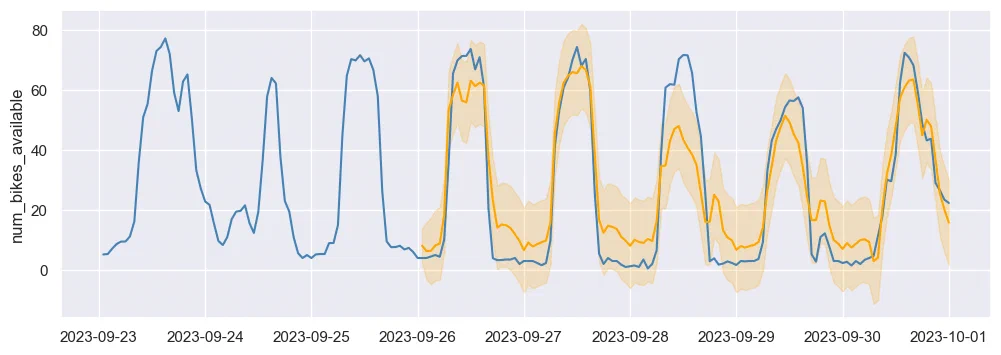
Now let’s use the model to predict 5 days of bikes availability. with the ML.FORECAST instruction. Since the timeframe is hourly, we set 120 as prediction horizon. The confidence interval level can also be customized, and is 0.95 by default.
SELECT *
    FROM ML.FORECAST(
        MODEL `velib.velib_arima_plus`,
        STRUCT(
	        120 AS horizon,
	        0.95 AS confidence_level
	      )
    )
The resulting prediction can be plotted, along with a confidence interval:
# Plot forecasted data
fig, ax = plt.subplots(figsize=(12,4))
prediction_start_date = forecast_data['forecast_timestamp'].min()
prediction_end_date = forecast_data['forecast_timestamp'].max()

## Actual data
sns.lineplot(
    data=real_data.loc[lambda x: x['time_slot'].between(
        prediction_start_date - pd.Timedelta(days=3),
        prediction_end_date
    )],
    x='time_slot', y='num_bikes_available', color='steelblue'
)
## Forecasted data
sns.lineplot(
    data=forecast_data,
    x='forecast_timestamp', y='forecast_value',
    color='orange'
)
## Forecasted confidence interval
ax.fill_between(
    data=forecast_data, x='forecast_timestamp',
    y1='prediction_interval_lower_bound', y2='prediction_interval_upper_bound',
    color='orange', alpha=.2
)
Decompose the prediction
Finally, we can get a deeper understanding of the prediction with the ML.EXPLAIN_FORECAST that will return a number of indicators for historical and predicted data:
SELECT *
    FROM
    ML.EXPLAIN_FORECAST(
		    MODEL `velib.velib_arima_plus`,
        STRUCT(72 AS horizon)
    )
Visualizing the results helps understand the importance of trends, seasonal patterns and residuals in the time series modelling:
fig, ax = plt.subplots(5, 1, figsize=(12, 12))
graph_df = df_bq_components.loc[lambda x: x['time_series_timestamp'] >= '2023-09-15']
sns.lineplot(graph_df, ax=ax[0], x='time_series_timestamp', y='time_series_data', hue='time_series_type')
sns.lineplot(graph_df, ax=ax[1], x='time_series_timestamp', y='trend', color='steelblue',  hue='time_series_type')
sns.lineplot(graph_df, ax=ax[2], x='time_series_timestamp', y='seasonal_period_weekly', color='firebrick',  hue='time_series_type')
sns.lineplot(graph_df, ax=ax[3], x='time_series_timestamp', y='seasonal_period_daily', color='forestgreen',  hue='time_series_type')
sns.lineplot(graph_df, ax=ax[4], x='time_series_timestamp', y='residual',  hue='time_series_type')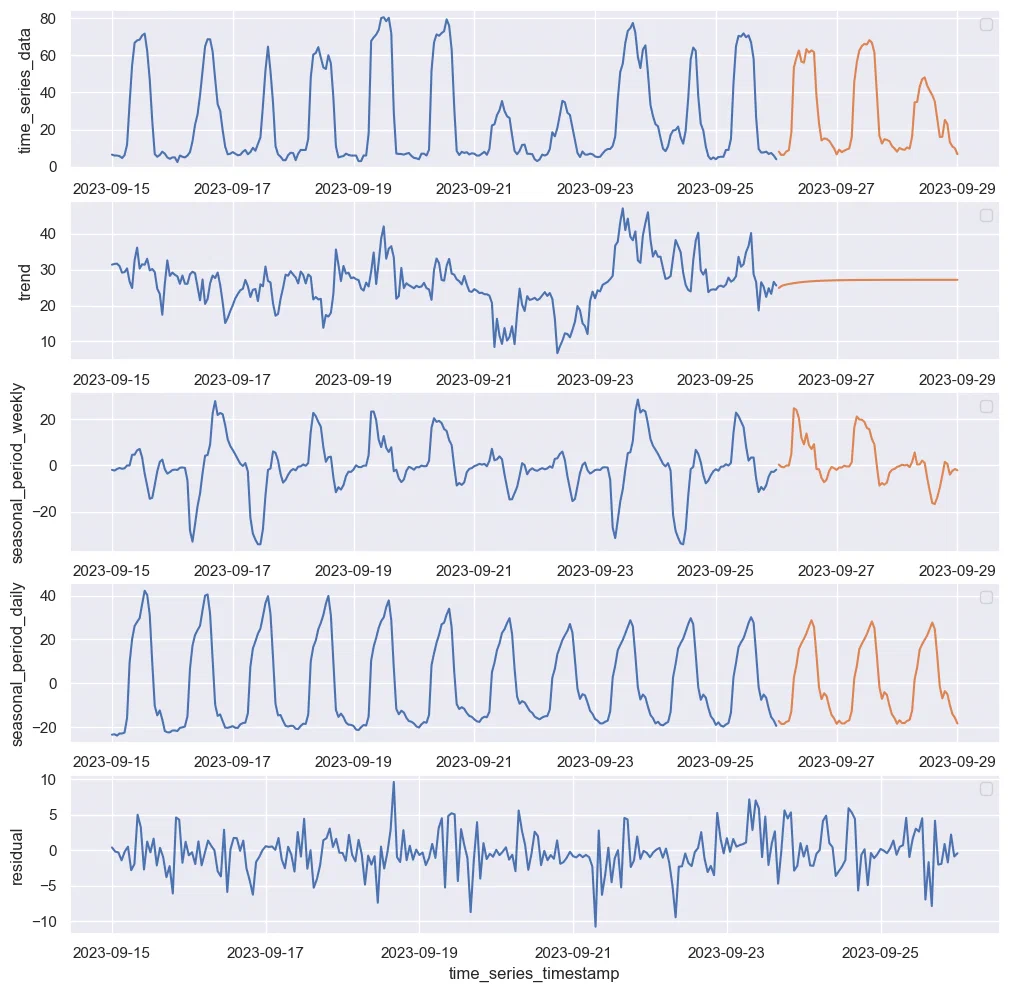
Going beyond a basic model
In addition to predicting a single time series, BigQuery ML offers more advanced options for enhancing your forecasting capabilities, on two main aspects:
- Simultaneously forecast multiple time series, up to hundreds of thousands. This can be achieved by utilizing the
TIME_SERIES_ID_COLparameter, which lets you manage and analyze multiple datasets concurrently for more extensive insights. - Include external regressors. This allows your model to account for additional variables that can impact your time series data, providing a more holistic and accurate prediction.